To plan information architecture for SEO, start by identifying what people search for and taking an inventory of existing pages. Then give each URL a purpose, organise services or products into understandable categories, connect relevant pages and test navigation and crawling paths. The result should help users find the right answer and allow search engines to discover important pages. An XML sitemap can help, but it does not replace a navigable link structure.
How to plan information architecture for SEO in six steps
Planning starts with search needs and business objectives, rather than the menu design. These six steps turn queries, existing pages and commercial priorities into a map that can be implemented and measured.
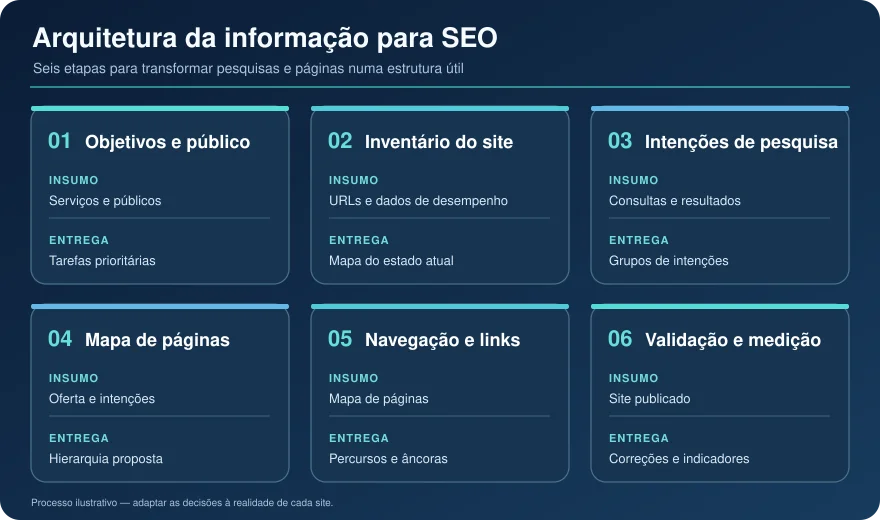
1. Define business objectives, audiences and search tasks
List what the website should enable people to do: request a proposal, book an appointment, compare treatments or buy a product. Identify each audience’s needs. Someone searching for “dental implants in Lisbon” expects service information and a way to contact a clinic; someone searching for “care after dental implants” needs an informative answer. This is an intent hypothesis to check against search results, not an instruction to create two pages on every website.
Input: offer, audiences and objectives. Decision: which tasks take priority. Deliverable: a list of intentions and expected actions at each stage of the journey.
2. Take an inventory of URLs and available data
Collect published pages, titles, categories, internal links, HTTP status codes, declared canonicals and indexing status. Compare the inventory with Google Search Console performance data, analytics landing pages and on-site search queries where available. A technical crawl may reveal pages reachable only through the sitemap, menus inaccessible to the crawler and multiple URLs serving similar purposes. Search Console alone does not necessarily provide a complete inventory: cross-check sources.
Input: exports, crawl and usage data. Decision: retain, improve, consolidate or remove pages after analysis. Deliverable: a current-state map, including potential orphan pages and conflicts to investigate.
3. Group queries by intent and assign a purpose to each page
Group searches by the problem the person is trying to solve. Different phrasings may belong on one page; searches with different expectations may justify separate URLs. Give each page a primary purpose: category, service, product, comparison, guide or supporting answer. Compare content and search results before deciding.
Two pages receiving impressions for similar terms does not prove cannibalisation. Check intent, content overlap, the pages Google selects and the usefulness of each URL. The answer may be to distinguish them, improve their links or consolidate them, with a clear destination for old URLs whenever changes are made.
Input: queries and existing pages. Decision: which intent belongs to which page. Deliverable: an “intent → destination URL → expected action” matrix.
4. Map categories, main pages and supporting pages
Draw a tree that makes sense to visitors. On a service website, a category page can present specialisms while important services have their own content. In an online shop, a category can link to subcategories and products. Names should match the offer and audience language, without creating nearly empty categories just to include keywords.
A pillar page with supporting content is useful for a broad topic with relevant subtopics. It is a planning model, not a Google technical requirement.
Input: intent matrix and offering catalogue. Decision: each page’s level and purpose. Deliverable: a proposed page map.
5. Plan menus, breadcrumbs and contextual internal links
Make important pages reachable through real links: menus, categories, cards and in-text links where they add context. Choose descriptive anchors, such as “dental implant treatments”, rather than repeatedly using “learn more” without explaining the destination. Breadcrumbs help people understand where they are and return to an earlier navigation level.
Google recommends HTML links with <a href> and explains that it uses links to discover pages and understand relationships. Elements that look like links but rely only on JavaScript events may not be reliably extracted. There is also no magic number of internal links per page: ask whether each link helps discovery or the reader’s task. Source: Google Search Central — link best practices.
Input: page map. Decision: useful journeys and anchors. Deliverable: a navigation and interlinking plan.
6. Validate crawling, indexing, navigation and results
Test a person’s journey on mobile and, separately, a crawler’s path from the homepage. Confirm that planned pages return appropriate responses, are linked through accessible URLs, have consistent canonicals and are eligible or ineligible for indexing according to the strategy. Check that links appear in rendered HTML and that each destination answers its intended need.
After implementation, compare URL groups before and after the change. Architecture improvements have context-dependent effects; they do not automatically produce indexing, traffic or sales.
Input: published website and baseline. Decision: what needs correction. Deliverable: a prioritised list and monitoring plan.
What information architecture changes for users and search engines
Information architecture is how a website organises, names and connects content so that people find what they need. For SEO, it includes editorial hierarchy, menus, categories, landing pages and internal links. URL format can help people understand context, but a /servicos/ folder in an address does not create a navigable relationship by itself. Google’s ecommerce guidance explains that it analyses links between pages to understand website structure. Source: Google Search Central — ecommerce site structure.
Page discovery, link context and orphan pages
An orphan page is a URL with no internal links detected within the inventory under analysis. It may remain reachable through an external link or sitemap, but lacks a useful internal path for visitors and crawlers. Verify the diagnosis in HTML and crawl data before classifying it as orphaned: dynamic menus, pagination and restricted sections can affect what you observe.
Anchor text also provides context about the destination. A link within an explanation of treatment options helps the reader more than an indiscriminate list of URLs. Google recommends that important pages have at least one link from another page on the same website. Source: Google Search Central — internal links.
Navigation, intent coverage and conversion paths
A good structure shows visitors a relevant next step. Someone arriving at a guide may need a service page; someone already evaluating a service may need details, answers to objections and a contact option. Navigation should not force everyone through the same funnel: some visitors enter directly on an internal page through search.
Editorially, connecting each intent to a clearly defined page can reduce confusion and redundancy. This is a planning recommendation, not a claim that Google assigns an “information architecture” score. For AI answer systems, passages with explicit subjects, direct answers and verifiable sources can be easier to understand outside the page’s context; none of these choices guarantees a citation.
Example page map: from the main service to specific questions
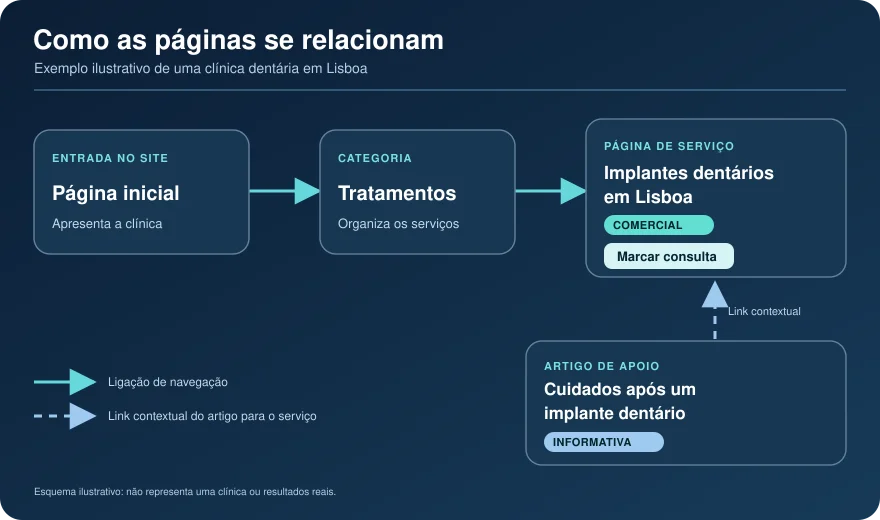
Imagine a fictional dental clinic in Lisbon. Its homepage introduces the clinic and links to “Treatments”; that page links to “Dental implants in Lisbon”, explaining the service, indications and assessment process, with an appointment call to action. An article on “Care after a dental implant” answers a follow-up question and links to the service where useful. This is not a real client or a The Key SEO case study.
| Example page | Main intent | Purpose and next step |
|---|---|---|
| Homepage | Get to know the clinic | Guide visitors to treatments and contact details |
| Treatments | Compare options | Find the appropriate specialism |
| Dental implants in Lisbon | Evaluate a local service | Explain treatment and enable appointment requests |
| Care after a dental implant | Get general guidance | Answer the question and point to the service when useful |
How to decide whether an intent needs its own page
A separate page is justified when the need is sufficiently distinct, useful content can meet it and it has a clear place in navigation. “Dental implants” and “how much does a dental implant cost” can share a page if it answers the second question well. If search results indicate different expectations, substantial information and independent usefulness, a separate page may make sense. Assess the SERP, available material and existing published pages.
A short question does not always justify another URL. Creating near-identical pages simply to change a city or keyword phrasing can harm the experience and fragment useful content.
How to connect service pages and supporting content
The commercial page should answer the questions needed for a decision without forcing visitors elsewhere to understand the essentials. A supporting article can explore one issue in depth. Add a contextual link from service to article and, where editorially justified, back to the service. Use descriptive anchors and avoid making an informational article the main destination for a query clearly aimed at hiring a service.
This also applies to online shops. A category presents options; a buying guide helps compare them; product pages explain each item’s features and conditions. The Key SEO’s ecommerce SEO page explores this type of website in more detail.
Which architecture problems should you fix first?
Prioritise problems affecting commercially important pages with verifiable evidence of an impact on discovery, indexing or navigation. Use affected URL counts only after measuring them, and weigh effort and change risk. This table is a diagnostic guide, not the findings of a particular website audit.
| Observed sign | Possible cause | How to check | Suggested action |
|---|---|---|---|
| Isolated service page | No link from a category or related content | Crawl, menu and HTML inspection | Add useful links from relevant pages |
| Two near-identical pages | Unclear categories or intent boundaries | Compare SERP, content and URL performance | Differentiate or consolidate with a URL plan |
| Many similar filter URLs | Uncontrolled facet combinations | Parameter inventory, indexing and logs where available | Decide which combinations are useful and how to manage the rest |
| Menu works visually but exposes no links | Event-dependent navigation | Inspect links in rendered HTML | Use crawlable HTML links |
| Old URLs fail after migration | No mapping or redirects | Test a sample and the mapping file | Redirect to equivalent destinations and update internal links |
Important pages without useful internal links
A relevant page receiving no internal links deserves review, but adding it to every menu is not the answer. Link from its category and related pages using text that describes the destination. Click distance can be a practical clue when investigating navigation; there is no universal limit that guarantees rankings.
Overlapping categories, redundant pages and unplanned indexable filters
A category should have an understandable purpose: presenting a useful selection. If “Dental treatments” and “Dental services” show the same selection without an editorial distinction, consider whether both are needed. Shop filters for brand, size and price can create many URL combinations. Accessibility and indexing decisions depend on demand, usefulness, inventory and crawl capacity. Consult Google’s faceted navigation guidance before changing technical rules; do not block every filter by default.
Confusing menus and links dependent on uncrawlable interactions
Menus are labels and paths, not merely visual components. If users hesitate between two categories with the same meaning, revise their names and page allocation. If a button opens a page through an event without a crawlable <a href>, check whether search engines can discover the destination. Google’s ecommerce documentation also recommends linking categories to subcategories and products when you want those pages discovered. Source: Google Search Central — ecommerce structure.
URL migrations without redirect mapping
Changing a menu does not require changing addresses. If a migration needs new URLs, map every important old URL to its new equivalent, configure appropriate permanent redirects, update internal links and test routes before and after publication. Do not redirect unrelated pages to one generic destination. Google’s guidance on site moves with URL changes explains technical precautions and subsequent monitoring.
How to measure whether the new structure works
Measure implementation separately from outcomes. The former shows whether the plan was applied; the latter shows what changed for search and the business. Record the publication date and compare reasonable periods, noting campaigns, seasonality, content changes and simultaneous technical updates.
| Indicator | Question answered | Possible source |
|---|---|---|
| Important pages with internal links | Are priority destinations reachable? | Crawl and page inspection |
| Orphan pages, errors and canonicals | Does the technical structure match the plan? | Inventory, crawl and Search Console |
| Impressions and clicks by page group | Has organic visibility changed? | Search Console |
| Organic landings and enquiries or sales | Do journeys support the business objective? | Analytics and reliable conversion records |
An increase in one category’s impressions does not establish that the architecture caused it. Compare affected groups, queries and landing pages; check that conversion measurement remained consistent. More clicks may not produce more enquiries if the new demand is mainly informational. Interpretation should lead to another decision, not merely a chart.
When to request an SEO architecture audit
An audit is useful before a redesign or migration, during catalogue growth, when pages accumulate without clear purposes or when declines are concentrated in certain URL groups. It also helps when menu names differ from how customers search. Start by clarifying objectives, assessing the website and comparing the offering with search intent and competitors; the diagnosis determines the scope of corrections.
The Key SEO provides SEO consultancy in Portugal with Rodrigo Filardi, adapting strategy to each project. To assess your architecture and implementation priorities, contact The Key SEO with the project’s objective, areas to reorganise and any planned changes.
Information architecture for SEO: frequently asked questions
Do I need to change every URL to improve the site’s architecture?
No. Architecture also depends on categories, navigation and internal links. Many improvements can preserve existing addresses. Change a URL when there is a concrete reason and plan redirects and internal link updates for altered addresses.
Can a category and a service page answer the same search?
They may appear for similar searches, but should have distinct purposes when both exist. A category helps people choose between services; a service page explains one solution. If both give the same answer, compare intent, content and performance before differentiating or consolidating.
Does an XML sitemap replace internal links and navigation?
No. An XML sitemap helps search engines discover URLs but does not replace people’s navigation paths or links between pages. Google explains that sitemap inclusion does not guarantee crawling or indexing. Source: Google Search Central — sitemaps.
How can ecommerce filters avoid thousands of similar pages?
Identify filter combinations with real buyer value and sufficiently distinct content. Then decide which need accessible URLs, internal links and indexing eligibility; manage the rest through a coherent technical strategy. Applying one rule to all filters can hide useful pages or create too many low-value URLs.
When should I review the architecture after publishing new pages?
Review links and the page’s hierarchy position at publication. Conduct a broader review when launching a service line, expanding categories, changing navigation or preparing a migration. Monitor affected URL groups after each change, allowing time and context to assess results.